
Junostarpro Docs
Font Management – Typography Panel
The Typography panel allows you to easily and centrally manage all main fonts on your Joomla 5 site, choosing different styles and settings for text, menus, and headings.
All changes are instantly previewed and automatically applied across your website - no coding required.
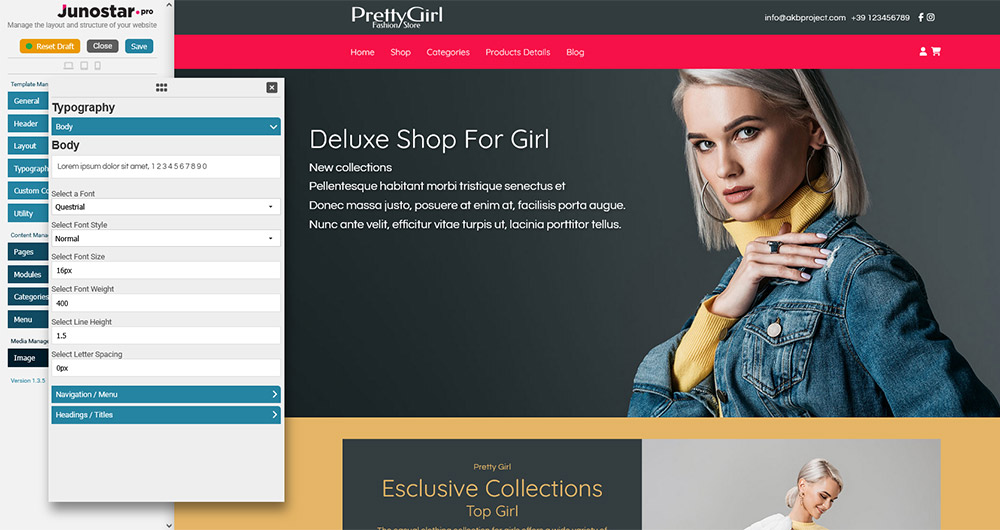
How the Typography Panel Works
You’ll find the Typography panel inside the JunostarPro Template Manager.
Font management is divided into three main sections, displayed as an accordion for a clean, organized interface:
- Body (open by default): controls the main text and paragraphs.
- Navigation / Menu: sets the font for navigation menus (main and submenus).
- Headings / Titles: manages the font for headings (H1, H2, H3, etc.) and special blocks.
To open a section, simply click its title; only one section can be open at a time, making edits and previews simple and clear.
Options Available in Each Section
For each area, you can select:
- Preview: At the top, you see a live preview (example: “Lorem ipsum dolor sit amet, 1 2 3 4 5 6 7 8 9 0”) that updates instantly as you change the settings.
- Font: choose from an updated list of Google Fonts or use a system font.
- Style: set normal, italic, or other available styles.
- Size: define text size (in px, rem, or em).
- Weight: set font thickness (e.g., light, normal, bold).
- Line height: adjust vertical space between lines.
- Letter spacing: increase or decrease the spacing between characters.
Every change is immediately previewed, so you can see the effect on your site before applying it.
Headings / Titles Section
The Headings / Titles section lets you control the style of all your headings (from H1 to H6) with maximum flexibility.
- Preview: At the top, you see a live preview (example: “Lorem ipsum dolor sit amet, 1 2 3 4 5 6 7 8 9 0”) that updates instantly as you change the settings.
- Font
- Style (normal, italic, etc.)
- Weight (light, regular, bold, etc.)
- Line Height
- Letter Spacing
H1/H6 - Individual Font Size:
For each heading level (H1, H2, H3, H4, H5, H6) you can set a specific font size:
- Select Font Size (h1)
- Select Font Size (h2)
- Select Font Size (h3)
- Select Font Size (h4)
- Select Font Size (h5)
- Select Font Size (h6)
Every change is immediately visible in the preview above, so you can quickly adjust your site’s hierarchy and visual impact without touching any code.
No CSS skills required: all settings are applied automatically and professionally.
The Typography panel lets you fully customize your site’s typography in just a few clicks, always providing an accurate live preview - safe and error-free.